Hello,
It's been a while since I found time and energy to work on my side project, MyStudio IDE, written in Rust using GTK.
After a few weeks of hiatus, I started hacking on some things on and off and I finally have something worth sharing with you all.
Features:
There's been quite a few changes in the project compared to previous release v0.1.2
Notable ones include:
Replace
SourceViewwidget withplaceholderinmain_window.uiand create multiple instances on-the-fly using code.
There are now ready-to-use functions in-place to manage this.Convert
notebook.rsto a Rust module and split it's functionality into several Rust files.
This change brings me great joy as the code is more maintainable to my eyes.All new PRs must be raised against
master. I felt usingdevelopmentbranch would become a burden.Update application layout so
GtkNotebooktabs aren't hidden when scrolling vertically.
This update broke the File Save feature in the project. I will talk more about this in few moments.Move
GtkNotebooktab caching APIs as part ofNotebookTabCachestruct instead of individual functions insidecachemodule.
This change is a conflict for me as it manipulates a staticVec<NotebookTabCache>which is technically not part of the cache struct.
Feature broken - Save Changes:
This feature works by fetching contents of TextBuffer inside SourceView, converting them to Rust string slice and writing it to disk.
Note that,
tabandpageare interchangeable in this context.GtkNotebookcalls them pages; I refer to them as tabs, even in code, for my understanding.
We first need to gain access to TextBuffer of the SourceView widget using GtkNotebook by finding tab (or page) index.
The application has an internal cache to keep track of open tabs for quick use. It is also used to switch to existing tab when clicking on file in Workspace Explorer, if it is already open.
Here's how this cache looks like:
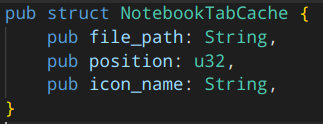
pubis an access specifier in Rust which is equivalent topublicin other languages.
structis how we hold groups of values. Learn more
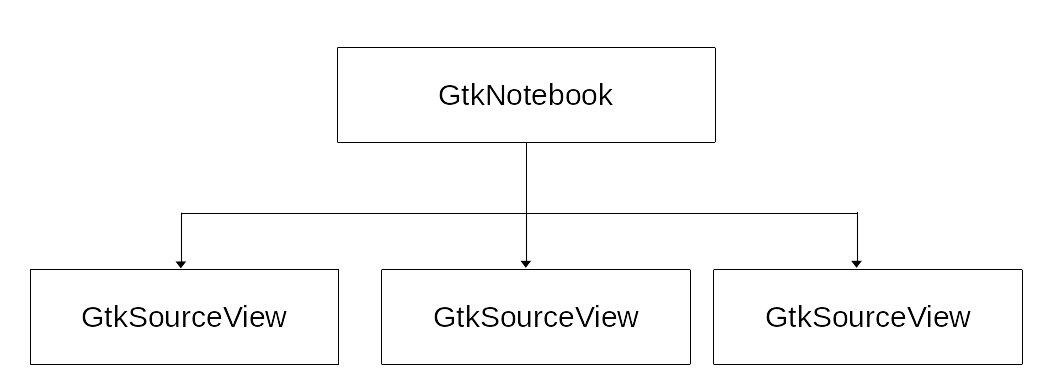
Previously on MyStudio IDE:
We use file_path from cache and compare it to currently open file (ref) to fetch page number (or tab index) from GtkNotebook. This would give us SourceView widget of currently open file which can be used to gain access to it's TextBuffer.
The layout looked as follows:
Present:
However, my fix for vertical scrolling issue has changed the layout slightly. I fixed it by placing a GtkScrolledWindow (which is the widget used to add scrolling to a widget) as a "main child" widget to GtkNotebook.
This widget would have a single child, GtkViewport (think of it as a container of other widgets).
Finally, I add my dynamically initalized SourceView widget as a child to GtkViewport.
The new layout looks as follows:
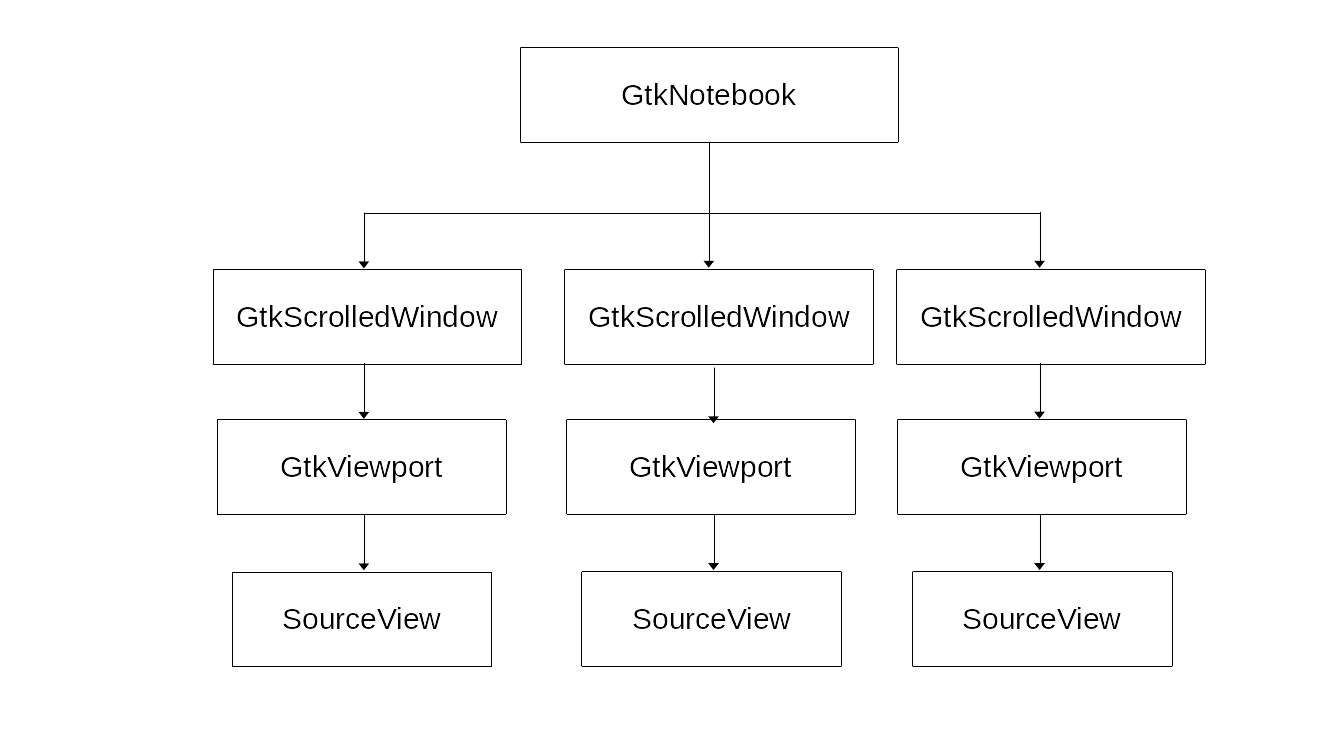
This layout has to be replicated, in code, for every file opened inside the editor.
The problem was, once we figure out the page number, we get a ScrolledWindow widget however what we're looking for is its "grandchild" - SourceView widget.
There was a upcast of GtkWidget to SourceView in the code which I didn't update when the layout fix was made and this ultimately broke the Save feature.
The solution was to access the first child of ScrolledWindow and the first child of Viewport to retrieve SourceView widget and return it for further processing.
You can find the Git commit for this here.
Here's my layout fix commit that caused this in the first place. link
It was an easy fix however I didn't realize it until I accidentally came across it while working on the project.
Future Plans:
The Save feature bug made me realize I need to improve how I develop this project. Here's an list of changes I'd like to bring to the project.
Convert the
mystudio-ideproject into a monorepo using Cargo Workspaces. PR linkCreate a
libmystudioRust library inside the monorepo to hold all "non-UI functionality". [DONE]Update
mystudio-iderepo to uselibmystudioand remove all non-essential code. [DONE]Write unit tests for both the projects.
I'm not sure when/how/if I can find the time for these changes but I know these big steps will ensure what I've written will work as expected in the future.
Thanks for reading! Leave a comment on your thoughts and ideas for this.
You can @ me on Twitter
Cheers!
Update: updated Future plans progress
Comments
Join the discussionNo comments yet. Be the first to comment.
MyStudio IDE
In this series, I will be covering updates and my plans for MyStudio IDE open source project.