KDE Dolphin Plugin for viewing Windows PE version info
Hello
In this blog post, I will be sharing how to create a plugin for KDE Dolphin to view “File version” info off a Windows EXE & DLL file.
Background
This project was born out of necessity to install mods for Skyrim on Linux. I needed to know the version number of Skyrim’s binary to proceed and it wasn’t readily available on Dolphin.
I found out about the excellent https://pypi.org/project/pefile/ Python library which helped me but I wanted to embed this functionality into Dolphin (if possible).
Later found out we can create custom plugins for Dolphin and the research began. As of writing, there is surprisingly very little information about building plugins for KDE Dolphin (not to be confused with “Services” which is available here).
AI Notice
The use of AI was necessary for this particular project. Read on to find my reasoning.
Firstly, I am not a C++ developer and this was my first C++ project. I prefer Python or Rust to build stuff but KDE Dolphin plugins must be built out of C++ as far as I understand (correct me if I am wrong here).
I’ve used ChatGPT on this project for 3 things:
1. Setup the development environment with CMake
This meant learning about CMakeLists.txt to detect required KDE & Qt dependencies. KDevelop was chosen as the IDE for this project.
2. KDE Dolphin plugin boilerplate code
Got to know about KPropertiesDialogPlugin and saw boilerplate code which was meant for Qt5 but it was a good lead. I later found KDE API reference page which gave me confidence to continue the project.
3. C++ Programming Language:
As a beginner in C++ with a big task of solve, I used ChatGPT to deal with low-level stuff like converting data into different type (std::string , QString, const char *), typecasting pointers, the use of #pragma once, unique_ptr, etc.
Lastly, the code on the project is largely based on my research including checking out “Version Control” plugin for KDE Dolphin (dolphin-plugins), API reference pages for KDE & Qt, Qt forums, grep.app to check implementation of a class and StackOverflow.
Requirements
Qt 6.8
KDE Dolphin 24.12.3 (might work on older versions)
pe-parse library from https://github.com/trailofbits/pe-parse
KDevelop (or any other IDE of your choice)
Refer to CMakeLists.txt listed below for the exact requirements.
Theory
The idea is create a custom class which extends KPropertiesDialogPlugin that parses PE header of the Windows executables or DLL file (selected by the user) and dynamically places a “Version: “ QLabel in the “General” tab of Properties dialog.
We build a shared library out of this custom class which will be installed at /usr/lib/qt6/plugins/kf6/propertiesdialog/ .
We will also create a manifest file so that KDE Dolphin can dynamically load the library when we right-click a file/folder.
Implementation
You can find the Git repo with latest changes here.
Here’s the project structure for reference:
helloworld
├── CMakeLists.txt                    # CMake
├── hello-dolphin-plugin.json         # Manifest file
├── helloworld.kdev4                  # KDevelop related
└── src
    ├── hello-dolphin-plugin.cpp      # Plugin source
    ├── hello-dolphin-plugin.h
    ├── pe-parser-wrapper.cpp         # Deals with PE files
    └── pe-parser-wrapper.h
Let’s setup CMake for the project. It will help us manage all dependencies.
# CMakeLists.txt

# Set minimum CMake version
cmake_minimum_required(VERSION 3.16)
# Set project name
project(hello-dolphin-plugin)

set(QT_MIN_VERSION "6.8.2")
set(KF_MIN_VERSION "6.11.0")

# Ensure the build directory is set early in the configuration
set(CMAKE_BINARY_DIR "${CMAKE_SOURCE_DIR}/build" CACHE PATH "Build directory" FORCE)

# ECM setup
find_package(ECM ${KF_MIN_VERSION} CONFIG REQUIRED)
set(CMAKE_MODULE_PATH ${ECM_MODULE_PATH} ${CMAKE_SOURCE_DIR}/cmake)
include(QtVersionOption)
include(ECMSetupVersion)
include(KDEInstallDirs)
include(KDECMakeSettings)
include(KDECompilerSettings NO_POLICY_SCOPE)
include(ECMDeprecationSettings)
include(ECMOptionalAddSubdirectory)

find_package(pe-parse REQUIRED)

find_package(Qt6 ${QT_MIN_VERSION} REQUIRED COMPONENTS
    Core
    Core5Compat
    Widgets
    Network
    DBus
)
find_package(KF6 ${KF_MIN_VERSION} REQUIRED COMPONENTS
    XmlGui
    I18n
    KIO
    TextWidgets
    Config
    CoreAddons
    WidgetsAddons
    Solid
)

# Add the shared library target
add_library(
    hello-dolphin-plugin
    SHARED
    src/hello-dolphin-plugin.h
    src/hello-dolphin-plugin.cpp
    src/pe-parser-wrapper.h
    src/pe-parser-wrapper.cpp
)

# Set properties for the shared library
set_target_properties(hello-dolphin-plugin PROPERTIES
    VERSION "${RELEASE_SERVICE_VERSION}"
    SOVERSION "1"
)

target_link_libraries(hello-dolphin-plugin KF6::CoreAddons KF6::XmlGui)
target_link_libraries(hello-dolphin-plugin KF6::KIOCore KF6::KIOFileWidgets KF6::KIOWidgets)
target_link_libraries(hello-dolphin-plugin pe-parse::pe-parse)

# Include directories for the project
include_directories(
    ${CMAKE_CURRENT_SOURCE_DIR}
    ${Qt6Widgets_INCLUDE_DIRS}
    ${KF6_INCLUDE_DIRS}
)

# Ensure that all output directories are set explicitly to the build directory
set(CMAKE_RUNTIME_OUTPUT_DIRECTORY ${CMAKE_BINARY_DIR})
set(CMAKE_LIBRARY_OUTPUT_DIRECTORY ${CMAKE_BINARY_DIR})
set(CMAKE_ARCHIVE_OUTPUT_DIRECTORY ${CMAKE_BINARY_DIR})

# Set the destination for installation if needed
install(TARGETS hello-dolphin-plugin DESTINATION ${KDE_INSTALL_PLUGINDIR}/kf6/propertiesdialog/)
install(FILES hello-dolphin-plugin.json DESTINATION  ${KDE_INSTALL_PLUGINDIR}/kf6/propertiesdialog/)
Let’s take a look at PEWrapper class. It’s main job is to parse an .exe or .dll file and extract it’s version number.
src/pe-parser-wrapper.h:
#pragma once

#include <pe-parse/parse.h>
#include <pe-parse/nt-headers.h>

#include <memory>

#include <QString>

#define MAX_MSG 81

using namespace std;

using ParsedPeRef =
unique_ptr<peparse::parsed_pe, void (*)(peparse::parsed_pe *)>;

class PEParserWrapper {

public:
  // This struct wasn't part of peparse library.
  struct VS_FIXEDFILEINFO {
    uint32_t dwSignature;
    uint32_t dwStrucVersion;
    uint32_t dwFileVersionMS;
    uint32_t dwFileVersionLS;
    uint32_t dwProductVersionMS;
    uint32_t dwProductVersionLS;
    uint32_t dwFileFlagsMask;
    uint32_t dwFileFlags;
    uint32_t dwFileOS;
    uint32_t dwFileType;
    uint32_t dwFileSubtype;
    uint32_t dwFileDateMS;
    uint32_t dwFileDateLS;
  };

  PEParserWrapper();
  virtual ~PEParserWrapper();
  string parseFile(QString filePath);
};
src/pe-parser-wrapper.cpp:
#include <pe-parse/parse.h>

#include <QString>
#include <QDebug>
#include <qlogging.h>

#include "pe-parser-wrapper.h"

using namespace std;

PEParserWrapper::PEParserWrapper()
{
}


PEParserWrapper::~PEParserWrapper()
{
}

// This code is based off readpe (previously pev) project.
// Source: https://github.com/mentebinaria/readpe/blob/master/src/peres.c#L551
int resource_callback(void *cbd, const peparse::resource &resource)
{
    if (resource.type == peparse::RT_VERSION) {

        // PE offset
        uint8_t pe_offset = 32;

        // This offset allows us to skip to the required VS_FIXEDFILEINFO data
        // which can now be casted to struct.
        // If you have more info about this, please let me know.
        uint8_t my_offset = 8;

        // NOTE: KDevelop complains with `-Wclass-align` here.
        // I don't know what that is and Google hasn't been helpful.
        // If you know what this is and how to fix it, please let me know :)
        auto verInfo = (const PEParserWrapper::VS_FIXEDFILEINFO *) (resource.buf->buf + pe_offset + my_offset);

        // Additional check to make sure we're on the right track.
        if (verInfo->dwSignature == 0xfeef04bd)
        {
            char value[MAX_MSG] = {0};

            sprintf(value, "%u.%u.%u.%u",
                    (uint32_t)(verInfo->dwFileVersionMS & 0xffff0000) >> 16,
                    (uint32_t)verInfo->dwFileVersionMS & 0x0000ffff,
                    (uint32_t)(verInfo->dwFileVersionLS & 0xffff0000) >> 16,
                    (uint32_t)verInfo->dwFileVersionLS & 0x0000ffff);

            // This is used to pass the data back to calling function
            vector<char>& vecPointer = *(vector<char> *)cbd;

            // This is used to store contents of `value`
            vector<char> v2 = {};

            // We insert at the end so that it will return
            // in correct (expected) order when the data is passed back
            for(char c: value)
            {
                // FIXME: Need to ensure only valid ASCII characters are inserted here.
                //        Right now, we are allowing `\x00' chars (NULL bytes?).
                v2.insert(v2.end(), c);
            }

            // Update reference here so vecPointer points to v2;
            vecPointer = v2;

            return 1;
        }
    }

    return 0;
}


string PEParserWrapper::parseFile(QString filePath)
{
    // The factory function does not throw exceptions!
    ParsedPeRef ref(peparse::ParsePEFromFile(filePath.toUtf8().data()),
                    peparse::DestructParsedPE);
    if (!ref) {
        qWarning() << "Failed to parse file " << filePath;
        return "";
    }

    vector<char> result;

    peparse::IterRsrc(ref.get(), resource_callback, &result);

    if (result.size() == 0)
    {
        return "";
    }

    return string(result.begin(), result.end());
}
Now, let’s check out the actual KDE Dolphin plugin code.
src/hello-dolphin-plugin.h:
#pragma once

#include <QObject>
#include <QString>

#include <KFileItem>
#include <KPropertiesDialogPlugin>

#include "pe-parser-wrapper.h"

using namespace std;

class HelloDolphinPlugin : public KPropertiesDialogPlugin
{
    Q_OBJECT

public:
    HelloDolphinPlugin(QObject *parent);

protected:
    PEParserWrapper *peWrapper;
    std::string version = "";
    // List the file types we're interested in.
    const std::vector<std::string> ALLOW_LIST = {".exe", ".dll"};

    void init();
    void injectFileVersionIntoGeneralTab(KPageWidgetItem *current, KPageWidgetItem *before);
    // This should be in camelCase, isn't it?
    bool is_target_file_type(QString fileName);

};
src/hello-dolphin-plugin.cpp:
#include <QObject>
#include <QWidget>
#include <QString>
#include <QVBoxLayout>
#include <QLabel>
#include <QUrl>

#include <KPluginFactory>
#include <kpluginfactory.h>
#include <KFileItem>
#include <KPageDialog>
#include <KPropertiesDialog>
#include <KSqueezedTextLabel>

#include <regex>

#include "hello-dolphin-plugin.h"
#include "pe-parser-wrapper.h"

using namespace std;

HelloDolphinPlugin::HelloDolphinPlugin(QObject *parent) : KPropertiesDialogPlugin(parent)
{
    this->peWrapper = new PEParserWrapper();
    this->init();
}

void HelloDolphinPlugin::init()
{
    if (this->properties->items().size() == 1)
    {

        QUrl itemUrl = this->properties->item().url();
        QString filePath = itemUrl.path();
        QString fileName = itemUrl.fileName();

        if (this->is_target_file_type(fileName))
        {

            this->version = this->peWrapper->parseFile(filePath);

            if (!this->version.empty())
            {
                // Injects "File Version" details in General tab.
                connect(
                    properties,
                    &KPropertiesDialog::currentPageChanged,
                    this,
                    &HelloDolphinPlugin::injectFileVersionIntoGeneralTab,
                    Qt::ConnectionType::SingleShotConnection
                );

            }
        }
    }
}

void HelloDolphinPlugin::injectFileVersionIntoGeneralTab(KPageWidgetItem *current, [[maybe_unused]] KPageWidgetItem *before)
{
    string tabName = current->name().toStdString();

    // Remove '&' character used for pneumatics.
    // There might be an easy way here :)
    std::regex pattern("&");
    tabName = std::regex_replace(tabName, pattern, "");

    // Looking for General tab to add the File Version
    if (tabName == "General")
    {
        QVBoxLayout *vbox = (QVBoxLayout*) current->widget()->children().first();
        QGridLayout *gridLayout = (QGridLayout*) vbox->children().first();

        QLabel *fileVersionLabelKey = new QLabel(QString::fromUtf8("Version:"));
        QLabel *fileVersionLabelValue = new QLabel(QString::fromUtf8(this->version));

        // 18 refers to row where the widgets will be placed. It is not in use so
        // I am hoping this won't overlap any other widget.
        // Confirmed by browsing `kio` repo at invent.kde.org
        gridLayout->addWidget(fileVersionLabelKey, 18, 0, Qt::AlignRight|Qt::AlignVCenter);
        gridLayout->addWidget(fileVersionLabelValue, 18, 1, Qt::AlignLeft|Qt::AlignVCenter);
    }
}

bool HelloDolphinPlugin::is_target_file_type(QString fileName)
{
    for (std::string ext: this->ALLOW_LIST)
    {
        if (fileName.endsWith(QString::fromUtf8(ext))) return 1;
    }

    return 0;
}


// Here we register the class as a plugin with additional metadata
// is available at the JSON file
K_PLUGIN_CLASS_WITH_JSON(HelloDolphinPlugin, "hello-dolphin-plugin.json")


// MOC file
#include "hello-dolphin-plugin.moc"
Lastly, here’s the manifest file which ties all this together.
hello-dolphin-plugin.json:
{
    "KPlugin": {
        "Description": "This plugin inserts 'Version' row in General tab for EXE/DLL files.",
        "Icon": "document-open",
        "MimeTypes": [
            "application/octet-stream"
        ],
        "Name": "Hello Dolphin plugin",
        "EnabledByDefault": true,
        "MimeType": "application/octet-stream",
        "X-KDE-Protocols": [
            "file",
            "desktop"
        ]
    }
}
End Result
You can see the version number for an EXE file:
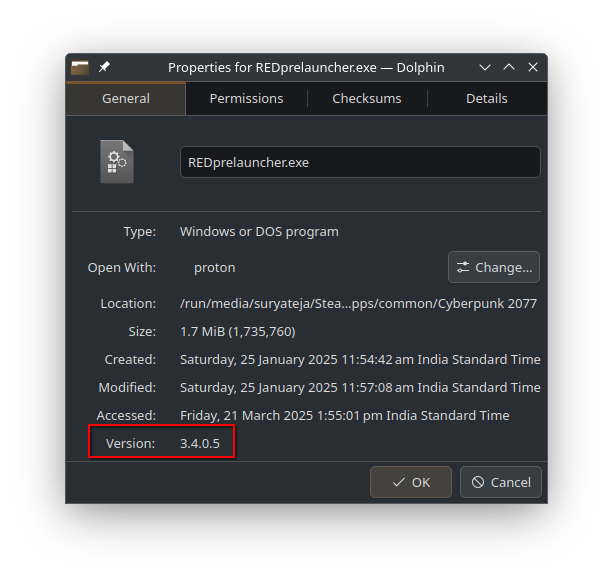
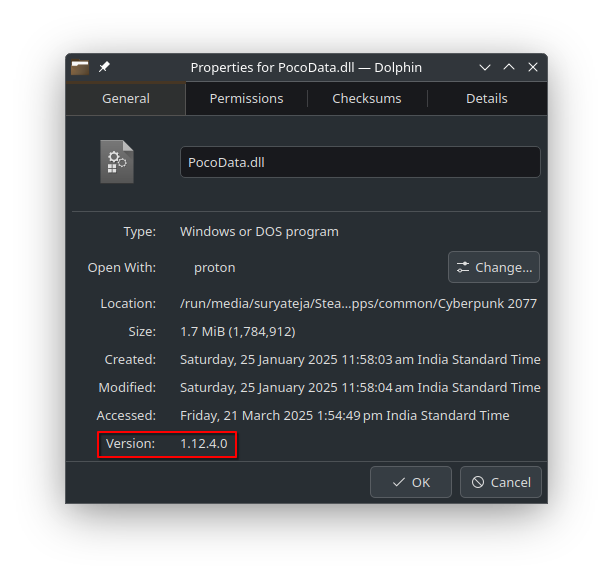
Here’s the screenshot for a DLL file:
I have one nitpick with QGridLayout:
It doesn’t automatically push widgets down by 1 when we’re trying to place a new widget at it’s place.
This meant I could’ve shown “Version” info just below “Type” which would’ve made a lot of sense but I have to take the win here, I guess.
Conclusion
This project was a lot of fun! I learned a few things:
C++ is a language I am mildly comfortable with
Using CMake for a project,
File headers and dealing with offsets
Concept of pointers is much clearer
Qt can be a viable replacement to GTK3 (which I like)
Thank you for taking the time to read the blog post in it’s entirety. I would appreciate if you could drop a Like to this post. It helps out the algorithm.
You can also @ me on Mastodon here :)
Bye for now.
Comments
Join the discussionNo comments yet. Be the first to comment.